KeePassium is a KeePass-compatible password manager for iOS. It offers automatic database synchronization, respect to privacy and premium user experience.
KeePassium is a commercial open source app. The "commercial" part gives you a well-maintained app with premium support. The "open source" part gives you the transparency expected from a password manager: you can personally audit the code and build the app you can trust.
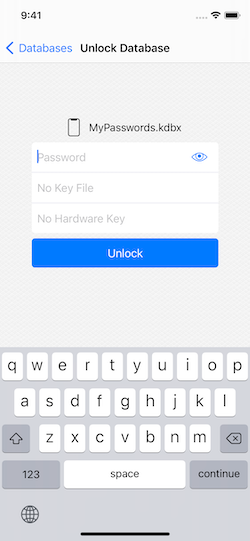
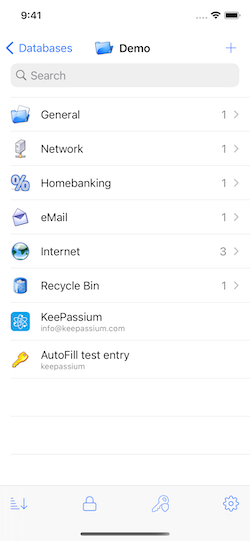
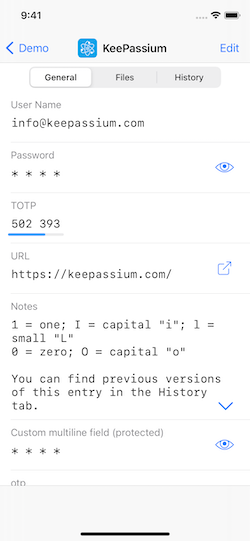
- Automatic database synchronization with zero setup
- Integrates with the system, does not ask for your storage credentials
- Works with iCloud Drive, Dropbox, OneDrive, Google Drive, Box, Nextcloud, SFTP, and probably more.
- Password AutoFill (iOS 12+) — also with synchronization.
- App and data protection:
- Biometric (Face ID / Touch ID) and passcode-based protection.
- Customizable timeouts for app, database and clipboard.
- Database names and app settings are also protected.
- Read/write support for all KeePass formats:
kdbx4(KeePass 2.35+),kdbx3(KeePass 2.x) andkdb(KeePass 1.x)- ChaCha20, Argon2, AES, Salsa20, Twofish algorithms
- Easy switching between multiple databases
- And more:
- Viewing TOTP codes (both RFC-6238 and Steam TOTP)
- YubiKey challenge-response support
- File attachments
- Custom fields
- Custom icons
- No ads
KeePassium relies on OS-provided integration with storage providers, and supports most providers that appear in iOS Files app.
- Full support (files are automatically downloaded and uploaded when changed): iCloud Drive, Box, Dropbox, Google Drive, OneDrive, Resilio Sync, Nextcloud (with hiccups), SFTP / WebDAV (via third-party apps)
- Limited support (no background sync, files have to be imported and exported manually): Mega, Cryptomator (it supports only import/export operations)
- Not tested yet: ownCloud, Tresorit
If automatic sync does not work for you, please make sure the cloud provider app can work in background (device settings — Dropbox/OneDrive/... — Background App Refresh = Enabled).
To fill your passwords easily and quickly, enable AutoFill feature: device settings — Passwords & Accounts — AutoFill Passwords — select KeePassium in the list.
KeePassium has multi-layer protection from unauthorized access.
- App Lock protects the app itself, by covering any in-app screens. This way, only you can see the unlocked database, the list of databases, or change app settings.
- Database Lock closes all opened databases after a timeout, or after a failed AppLock attempt. It also removes any remembered master keys from keychain.
- Encryption protects the contents of database files. The app relies on CommonCrypto library (for AES and SHA) and time-proven reference implementations of crypto algorithms (see Credits).
By default, AppLock requires a passcode (of any complexity). For convenience, you can configure the app to use Face ID/Touch ID instead.
KeePassium is available on the App Store. Current beta can be installed via TestFlight.
To build your own binary, download the project and open it in Xcode 10.2 (or above). All the dependencies are already included.
Yes, KeePassium can be used free of charge (gratis) and is also free as in speech (libre). An optional premium subscription enables a few convenience and time-saving features, and supports the project.
But I can just... Yes, you can take the source code and build your personal premium version for free (gratis). Feel free to do so, but please be nice and don't request premium support for personal builds. Also, if you delegate this to a freelancer, please make sure you can trust them.
Code contributions cannot be accepted due to formalities, but feel free to:
- Report bugs, suggest new features
- Contribute to translation
- Write an AppStore review
- Consider buying a premium subscription :)
- Bug reports: GitHub Issues
- Discussion: /r/KeePassium
- Updates: KeePassium Blog and Twitter
KeePassium is created and maintained by Andrei Popleteev, founder of KeePassium Labs.
The project would not be the same without some third-party components:
- Graphics:
- Feather icons by Cole Bemis (MIT licence)
- Ionicons by Ionic (MIT license)
- Linecons by Andrian Valeanu (CC-BY-ND 3.0 license)
- Fancy deboss pattern by Daniel Beaton (CC-BY-3.0 when downloaded)
- Icons8 icons (paid license, can also be used with attribution only)
- System settings icon by Vicons Design (CC-BY 3.0 license)
- Bold outline icons by Round Icons (proprietary license).
- KeePassXC icons by KeePassXC team (MIT license).
- Code:
- AEXML by Marko Tadić (MIT license)
- Rijndael implementation by Szymon Stefanek (public domain)
- Argon2 by Daniel Dinu, Dmitry Khovratovich, Jean-Philippe Aumasson, and Samuel Neves (CC0 license)
- ChaCha20 & Salsa20 implementation by D. J. Bernstein (public domain)
- Twofish implementation by Niels Ferguson (custom very permissive license).
- Yubico Mobile iOS SDK by Yubico AB (Apache 2.0 license)
- TPInAppReceipt by Pavel Tikhonenko (MIT license)
- SwiftDomainParser by Dashlane (MIT license)
- GzipSwift by 1024jp (MIT license)
- Base32 for Swift by Norio Nomura (MIT license)
- Toast-Swift by Charles Scalesse (MIT license)
- WhatsNewKit by Sven Tiigi (MIT license)
- zxcvbn-ios by Dropbox (MIT license)
- Other:
- Passphrase wordlists by Electronic Frontiers Foundation (CC-BY-3.0 license)
To avoid backdoors in third-party code, it has been checked by the main developer. Verified files are directly included in the project — we don't want any surprises sneaking via package managers.
KeePassium Password Manager
Copyright ©2018–2023 Andrei Popleteev, KeePassium Labs.
KeePassium is a commercial open-source app, available under the GPLv3 license. Our intention is to provide the maximal possible transparency: you can personally audit the code and build your own binary.
While derivative works (forks) are explicitly allowed by the GPL, please don't submit them to AppStore. Due to a conflict between GPL and AppStore terms of service, GPL-licensed apps are banned from AppStore. For the same reason, KeePassium cannot accept code contributions.
For commercial licensing or custom modifications, please contact us.